How to Set Up Follow-Up Testing
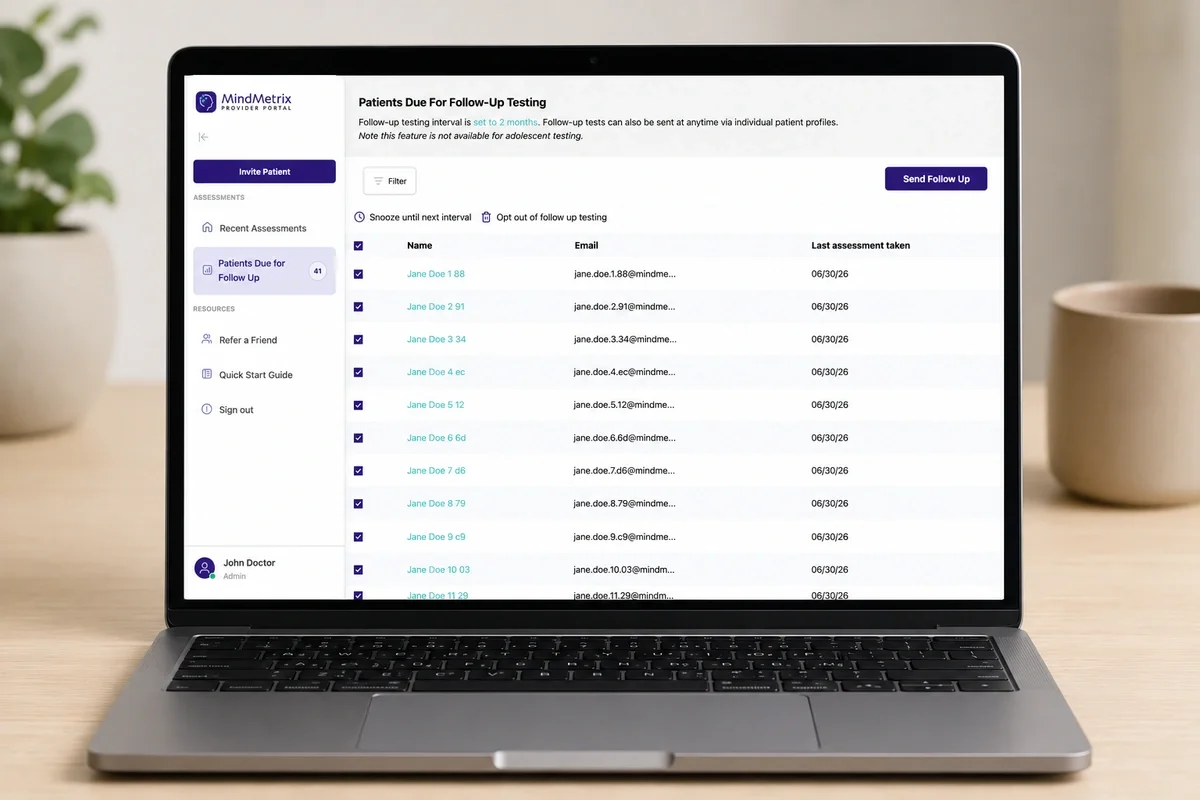
MindMetrix Follow-up Testing - How it Works
Updated July, 2026
The initial baseline assessment is only the beginning of the patient journey.
Whether you're treating ADHD, depression, anxiety, trauma, or other mental health conditions, meaningful care requires understanding how symptoms change over time. Follow-up testing helps clinicians measure treatment response, identify patients who may need additional support, and make more informed clinical decisions.
With MindMetrix Follow-Up Testing, practices can automatically identify patients who are due for follow-up assessment and monitor symptom changes over time through longitudinal reporting.
Here's how to get started.
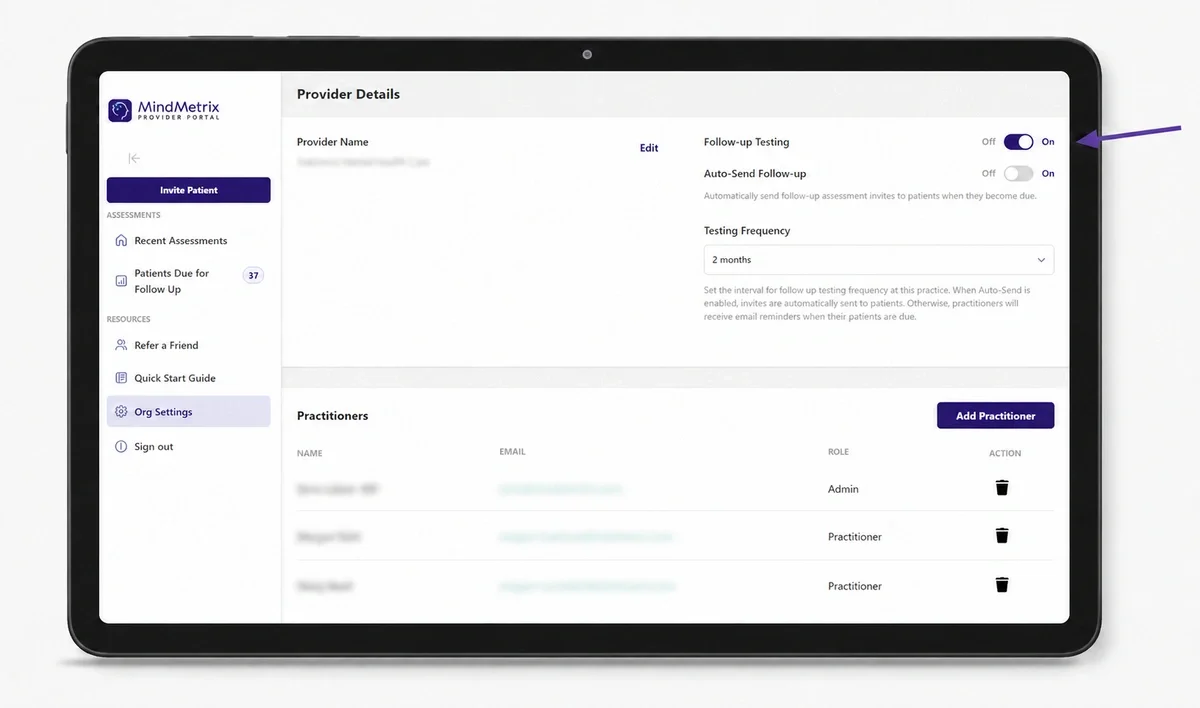
Step 1: Enable Follow-Up Testing
Getting started takes only a few clicks.
In your provider dashoard, click Org Settings in the left navigation. From there, the Follow-Up Testing toggle at the top should be turned On.
Step 2: Select Your Follow-Up Frequency
Your account gives you the flexibility to track patient outcomes at intervals that align with your clinical workflow and treatment approach. By default, it is set to "every 6 months."
Choose when patients should become eligible for follow-up testing:
- 2 months
- 3 months
- 4 months
- 6 months
- 12 months
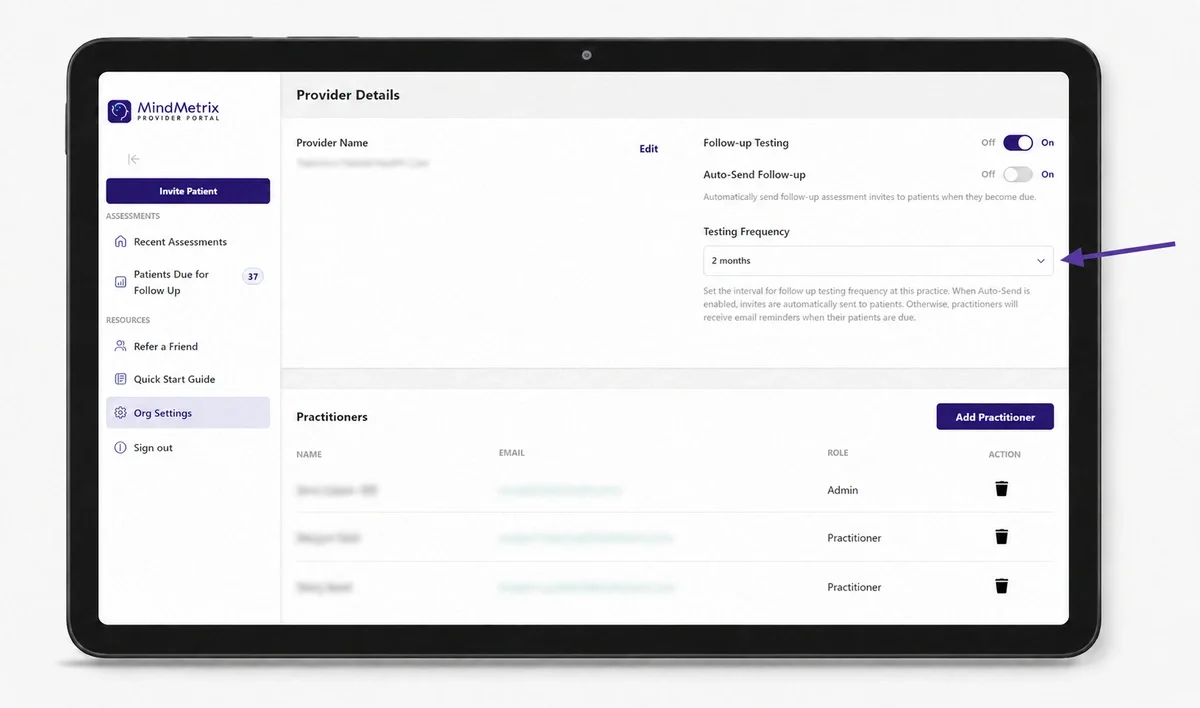
Once enabled, MindMetrix automatically tracks assessment completion dates and reminds you when patients are due for their next follow-up.
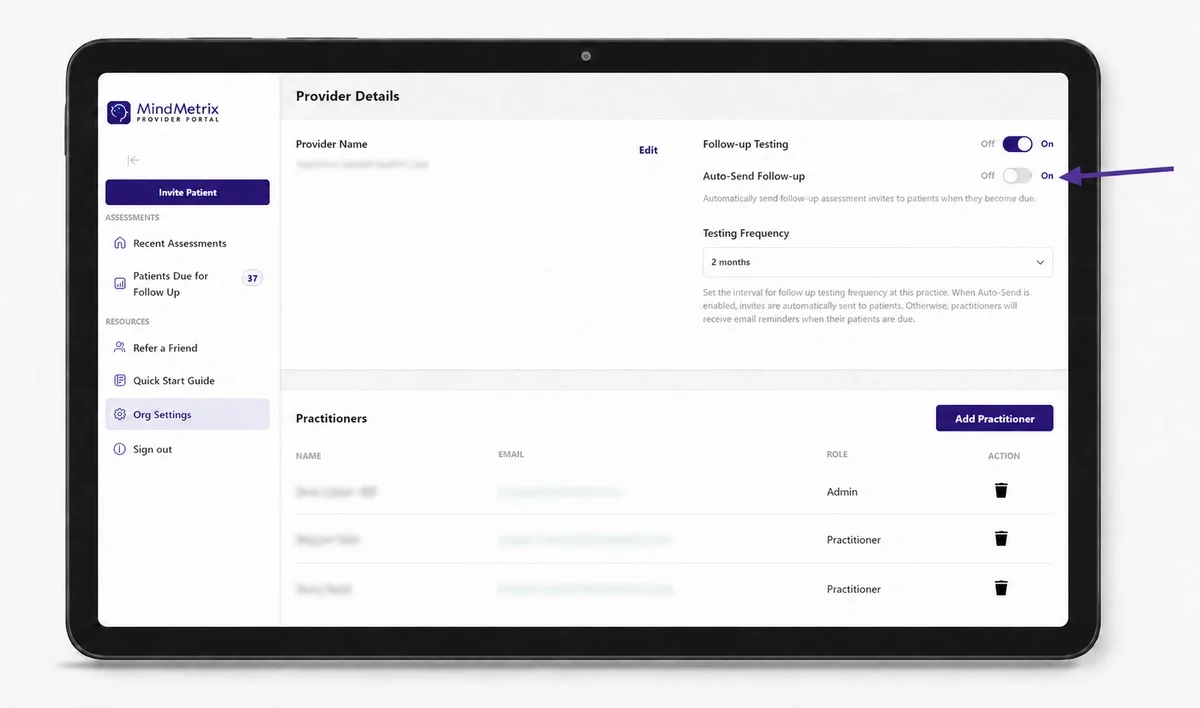
Step 3: Turn On Automated Follow-Up Testing
Want to keep reassessments on schedule without sending every invitation manually? Turn on Automated Follow-Up Testing in your account settings.
Once enabled, MindMetrix will automatically send invitations to patients as they become due based on your selected follow-up frequency. If patients are already waiting in your follow-up queue, invitations will be sent up to your practice’s weekly limit until the backlog is cleared. This prevents your team from being overwhelmed by too many completed assessments at once.
A few things to know before turning on automation:
- Patients stay in control. They can skip or opt out of follow-up testing and let you know if they are no longer receiving care from your practice. MindMetrix handles these responses automatically and displays their status in your dashboard.
- Clinicians may receive safety alerts. Follow-up assessments screen for suicidal ideation. Let your clinical team know when automation is activated so they are prepared to respond to any new alerts sent by email. [View sample internal communication.]
- Follow-ups can fit into your existing workflow. Many practices review completed assessments during the patient’s next scheduled appointment instead of booking a separate visit, but the approach is entirely up to your team.
Step 5: Review Patients Due for Follow-Up Testing
When patients reach their follow-up interval, you’ll receive an email letting you know how many patients are due. You’ll also see them in the Patients Due for Follow-Up tab in your dashboard.
If automated follow-up testing is enabled, MindMetrix will send invitations automatically based on your weekly limit. You can still review and manage patients from the dashboard at any time.
From the dashboard, you can:
- Send a follow-up assessment immediately
- Snooze a patient until the next follow-up interval
- Review all patients currently due for follow-up testing
- See which invitations have been sent automatically
Step 5: Patients Complete the Follow-Up Assessment
After you send a follow-up assessment, the patient receives an email invitation with a secure link to complete testing online. They are welcomed back, and informed that the assessment will take anywhere from 15 minutes to 40 minutes, and that it will likely take about half the amount of time they took on their initial assessment.
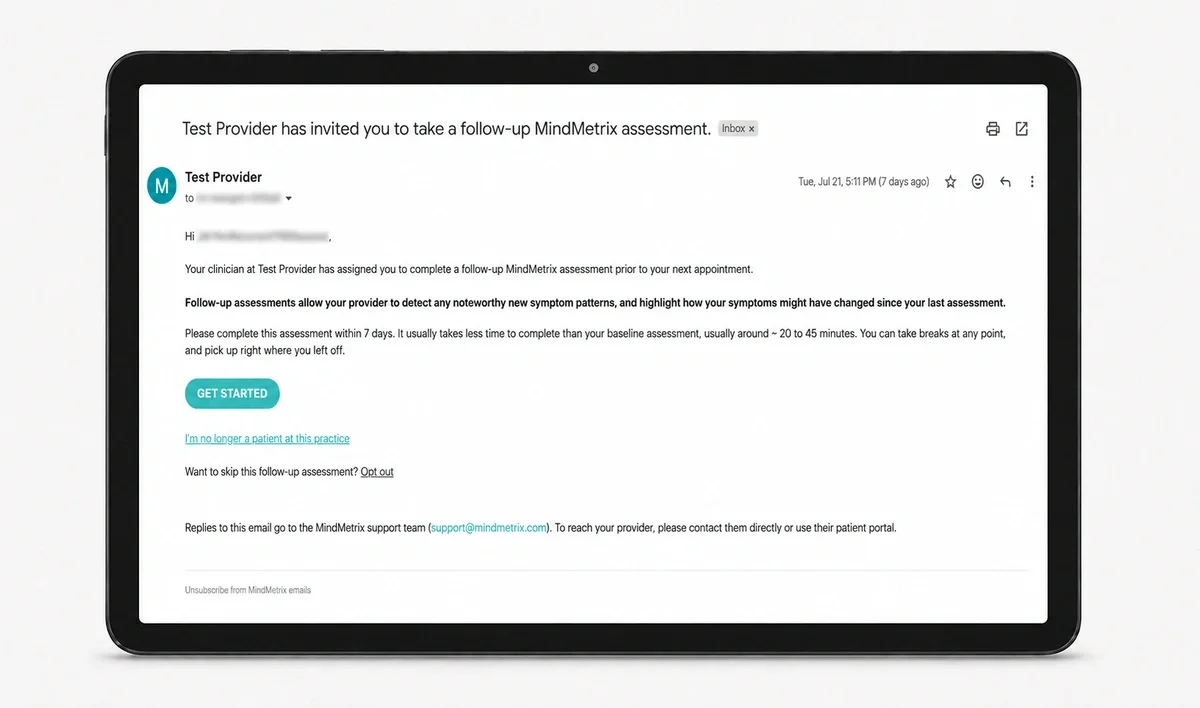
Progress is saved automatically, allowing patients to take breaks, and complete the assessment at their convenience.
MindMetrix already has key demographic and background information from the initial assessment, and they fill out fewer rating scales in follow-up testing, making this experience a shorter, more streamlined assessment focused on what's changed and what's new since the patient's last assessment.
Step 6: Review Progress
Once a patient completes their follow-up assessment, you'll receive an email notification letting you know their updated report is ready to review, just as you do with the initial assessment.
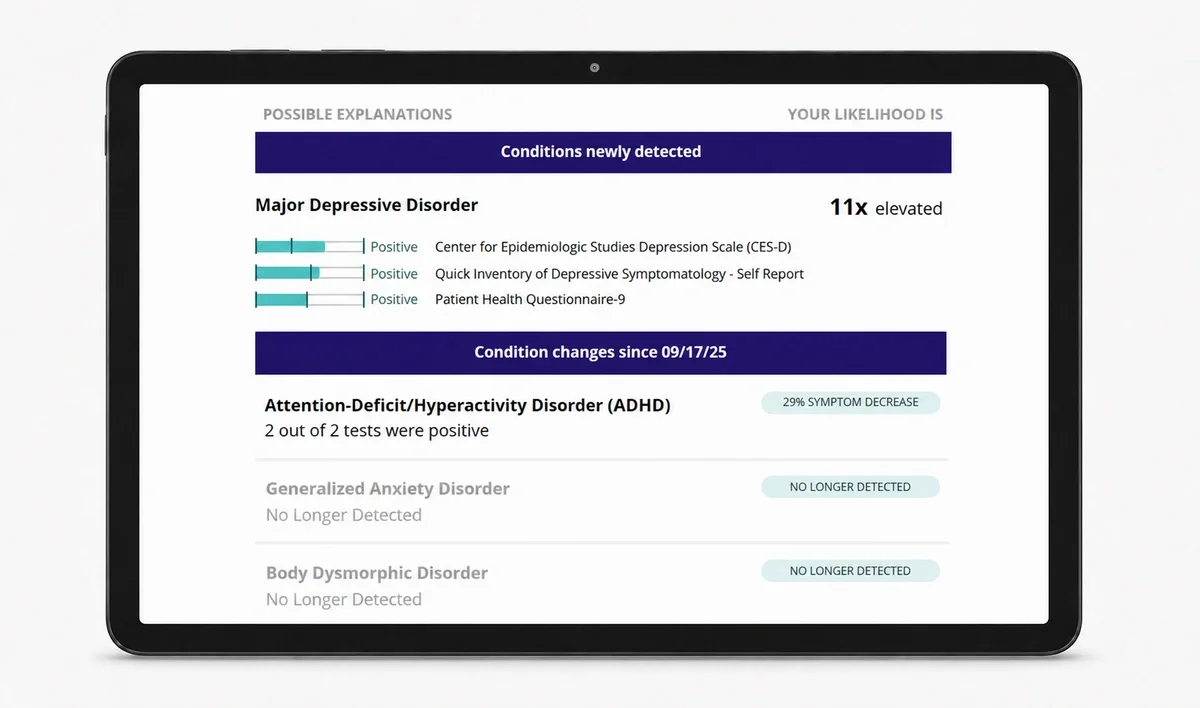
The follow-up report highlights:
- Newly detected conditions
- Changes in symptom severity since the previous assessment
- Conditions that are no longer detectedBy comparing results over time, clinicians can quickly identify meaningful changes, evaluate treatment effectiveness, and make more informed decisions about ongoing care.
Commonly Asked Questions
Do follow-up assessments count toward my monthly invite limit?
No. Follow-up assessments are included with your MindMetrix account and do not count as new patient assessments.
Who can enable Follow-Up Testing?
Follow-Up Testing settings are managed at the practice level by an account administrator. To enable or modify Follow-Up Testing settings, navigate to Org Settings.
Can I decide which patients receive follow-up testing?
Yes. Practices can send or snooze follow-up assessments manually or enable Automated Follow-Up Testing to send invitations when patients become due. Patients can skip or opt out at any time.
What happens if I snooze a follow-up reminder?
If you choose to snooze a patient, MindMetrix will remove them from the current follow-up queue and notify you again at the next follow-up interval you've configured.
Is the follow-up assessment the same as the initial assessment?
No. Follow-up assessments are designed to be shorter and more streamlined than the initial evaluation. Previously collected demographic and background information is carried forward, allowing patients to focus on updating their current symptoms and experiences.
What information is included in the follow-up report?
The report highlights key changes since the patient's previous assessment, including newly detected conditions, changes in symptom severity and conditions that are no longer detected.
Why should I use Follow-Up Testing?
Mental health symptoms change over time, and treatment decisions are strongest when they're informed by data. Follow-Up Testing helps clinicians monitor outcomes, evaluate treatment effectiveness, identify emerging concerns, and support measurement-based care without adding significant administrative burden.
Can I bill CPT 96130 for follow up testing?
Yes, so long as 31 or more minutes were spent reviewing the results (either face to face with the patient + preparation for their visit), and so long as it meets your specific payor mix's requirements. Note that MindMetrix provides coding and billing information for educational purposes. Practices should confirm accuracy with their billing team and ensure documentation meets all internal and payer-specific requirements. MindMetrix cannot guarantee reimbursement outcomes. Providers and practices are solely responsible for how they code, bill, and document.
Ready to boost your practice?
Try 3 complimentary assessments on us.