How to Get the Most Out of Your MindMetrix Free Trial

August, 2026
Signing up for a free trial is easy. The real value comes from seeing how MindMetrix works in your clinical practice and whether it helps you build a more complete picture of the patients you treat.
MindMetrix is a comprehensive mental health assessment designed to support clinical decision-making. Patients complete the assessment on their own, and you receive a structured report that can help surface symptoms, possible comorbidities, and areas that may deserve further exploration during the clinical interview.
The goal of your trial is not simply to click through the platform. It is to determine whether MindMetrix is useful for your patients, fits your workflow, and can be implemented sustainably in your practice.
Why Complete a MindMetrix Trial?
See What MindMetrix Adds to the Clinical Picture
You can take the assessment yourself to understand the patient experience, but the best way to evaluate MindMetrix is to use it with real patients.
When you review a completed report, you can see how MindMetrix may help you:
- Surface symptoms or concerns that may not come up during a traditional interview
- Identify areas that may warrant further clinical exploration
- Recognize possible comorbidities or overlapping symptom patterns
- Create more focused conversations with patients
- Generate structured, EMR-ready documentation that supports clinical decision-making
MindMetrix does not replace the clinical interview or clinician judgment. It gives you additional structured information to consider as you evaluate the patient and make treatment decisions.
Find the Workflow That Works for Your Practice
Every practice operates differently. Your trial gives you an opportunity to see where MindMetrix fits most naturally into your existing workflow.
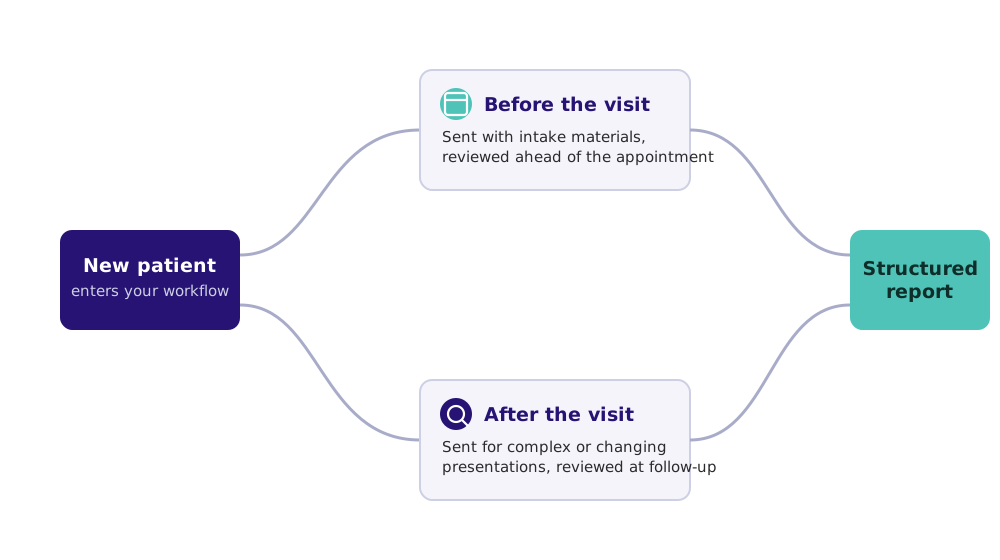
Many providers test one or both of these approaches:
Before the initial appointment
- Send MindMetrix along with your intake materials.
- Review the report before meeting with the patient.
- Use the findings to help guide areas for further discussion during the visit.
After the initial evaluation
- Use MindMetrix when you want a broader assessment of the patient's symptoms.
- Send it to patients with complex presentations, overlapping symptoms, or changes in their clinical picture.
- Review the report as part of a follow-up visit.
There is no single right workflow. The goal is to find an approach that gives you useful information without creating unnecessary work for you or your staff.
Understand What Implementation Could Look Like Financially
Clinical value is only one part of the decision. MindMetrix also needs to make sense for your practice operationally and financially.
During your trial, you can explore different approaches to covering the cost of MindMetrix based on your patient population, payer mix, credentials, contracts, and billing processes.
Depending on your practice, options may include:
- Billing insurance when appropriate and covered
- Offering a patient-pay option when permitted
- Incorporating MindMetrix into an existing assessment or intake workflow
- Using a combination of reimbursement and patient-pay approaches
Coverage varies by payer, provider credential, contract, and other factors, so reimbursement should always be verified for your individual practice.
Our team can help you think through the options and identify questions to review with your billing team or payers.
What to Expect During Your Trial
Step 1: Create Your Free Trial Account
Complete the trial registration to activate your MindMetrix account.
Step 2: Use Your Three Complimentary Assessments
Your trial includes three complimentary assessments.
We recommend using them with real patients early in your trial rather than saving them for the "perfect" case. This gives you time to review the reports, discuss the findings with patients, and decide whether the information is useful in your clinical workflow.
Step 3: Complete Your Trial Within 30 Days
Your trial remains active for 30 days, giving you time to evaluate both the clinical experience and the practical side of implementation.
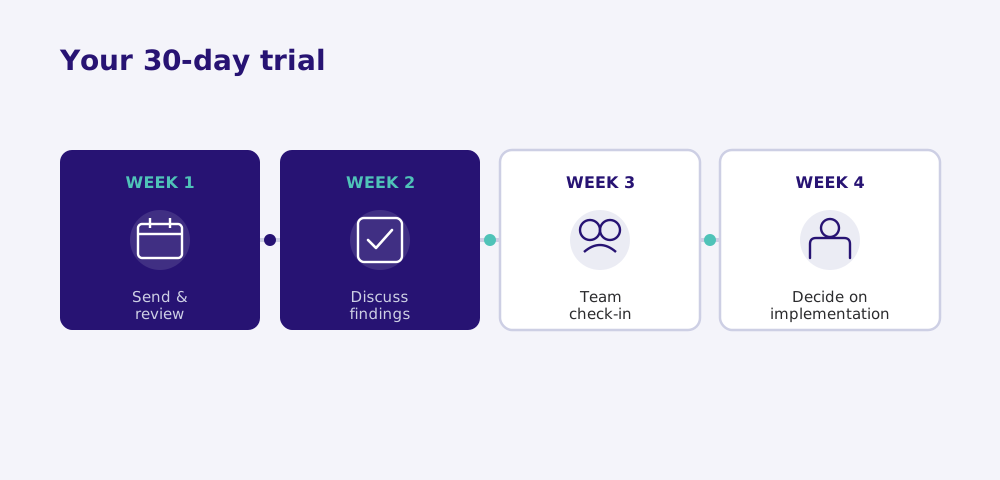
Weeks 1 and 2: Use MindMetrix With Patients
Focus on experiencing the assessment in real clinical care:
- Send assessments to selected patients
- Review completed reports
- Discuss relevant findings with patients
- Consider whether the information changes, confirms, or adds to your clinical thinking
- Evaluate how easily MindMetrix fits into your current workflow
Weeks 3 and 4: Think Through Implementation
Once you have used MindMetrix with patients, the next question is whether it makes sense to incorporate it into your practice.
Schedule time with our team to discuss:
- How other practices incorporate MindMetrix into their workflow
- Billing considerations and reimbursement questions
- Patient-pay approaches, when appropriate
- Operational considerations for your practice
- Whether MindMetrix is a good fit for your organization
By the end of your trial, you should have a much clearer understanding of how MindMetrix could support your clinical work and what implementation would require.
Which Patients Should You Use MindMetrix With?
Not sure where to start? Consider patients where a broader, structured assessment could add useful information.
New Patients
MindMetrix can provide a structured baseline early in the care journey, helping you explore symptom patterns, possible comorbidities, and areas of functional impairment before treatment decisions are finalized.
It can also help you enter the initial visit with more information about areas that may deserve further discussion.
Existing Patients With Complex or Unclear Presentations
Consider using MindMetrix with patients who:
- Have symptoms that have been difficult to fully understand
- Present with new or changing concerns
- Are not progressing as expected
- May have multiple overlapping conditions
- Would benefit from a broader assessment of their current symptoms
The report can help organize a large amount of patient-reported information into a structured clinical picture for you to evaluate.
Try It Yourself
We also encourage clinicians to complete the assessment themselves.
Doing so can help you:
- Experience the assessment from the patient's perspective
- Understand its length and flow
- Become familiar with the report before introducing it to patients
- Feel more comfortable explaining the process to patients
Tip: For the most realistic experience, answer the questions as you genuinely would rather than trying to endorse a wide range of symptoms simply to see what appears in the report. The goal is to experience the assessment the way a patient typically would.
Make Your Trial a Real Test of Fit
A successful MindMetrix trial is not simply about using all three assessments. It is about answering a few important questions:
Does MindMetrix give you useful information about your patients? Does it support your clinical decision-making? Can it fit naturally into your workflow? And is there a practical path to implementing it in your practice?
Our team is available throughout your trial to answer questions, help you think through workflows, and discuss implementation and billing considerations.
The best way to evaluate MindMetrix is to use it. Start with a few real patients, review the reports, and see what it adds to your clinical picture.
Ready to boost your practice?
Try 3 complimentary assessments on us.