Introducing the MindMetrix API
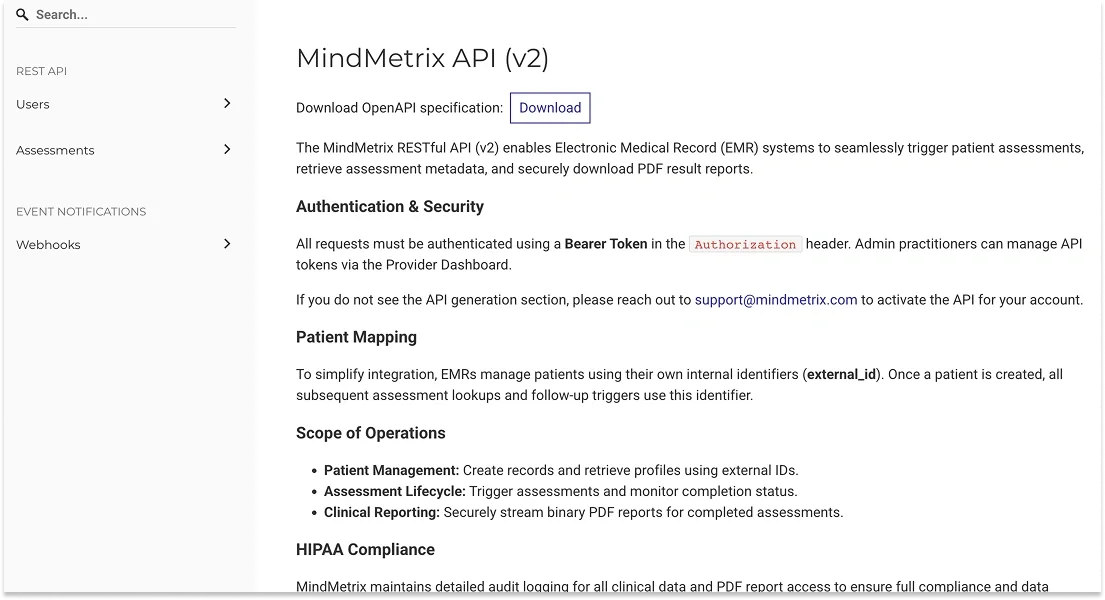
Introducing the MindMetrix API: Connect Assessments Directly to Your EMR
May 20, 2026 | Ze'ev Lailari
We built MindMetrix to take the friction out of mental health assessment and give providers a way to back their diagnoses with data. Today we're getting rid of any friction that existed in sending/receiving assessments: the MindMetrix public API (v2) lets your Electronic Medical Record (EMR) system talk directly to MindMetrix. Patients get assessed, results flow back automatically, and your staff stops copying data between two systems.
This post explains what the API is and why it matters for your practice, then provides you/your developers everything they need to start building.
For practice admin: what this can do
The API let's you automate the main touchpoints with MindMetrix so that you can trigger them from your existing systems:
It triggers assessments from inside your existing software. Your front desk or clinician creates a patient in your EMR as usual. Behind the scenes, your system tells MindMetrix to start an assessment for that patient via API. No duplicate data entry.
It brings results back automatically. When a patient finishes, your EMR can pull the completed report and attach the PDF to the chart without anyone lifting a finger. Status, completion time, and the report all come through the connection.
It tells you about the things that matter immediately. The API can notify your system the moment an assessment is completed, the moment a patient is flagged for moderate or high suicide risk, and when a patient is overdue for a follow-up.
It is HIPAA compliant. Every access to clinical data and every PDF download is audit-logged, and the connection is built to support HIPAA obligations.
The practical payoff is fewer manual steps, fewer dropped follow-ups, and faster awareness of high-risk cases. The work to set it up is a one-time project for your developer or EMR vendor; the time savings are ongoing.
How to turn it on
Getting started is a short, guided process. We want to make sure the integration fits how your practice works before flipping the switch.
- Email us at support@mindmetrix.com. Let us know you'd like to enable the API for your account.
- Have a quick conversation. We'll walk through your use case, answer any questions, and activate API access for your practice.
- Find your token in Settings. Once you're enabled, an admin practitioner can access the practice's API token directly from the Settings page of your MindMetrix account. That token is what your developer uses to authenticate every request (see the developer section below).
- Choose your webhooks. The same Settings page gives you an interface to include or exclude specific webhook events. So, you can, for example, turn on real-time suicide-risk alerts while leaving other notifications off. You can also set your target URL and retrieve your signing secret there.
That's it. From there, you, your developer or EMR vendor can build against the endpoints documented below.
A tour of the Settings page
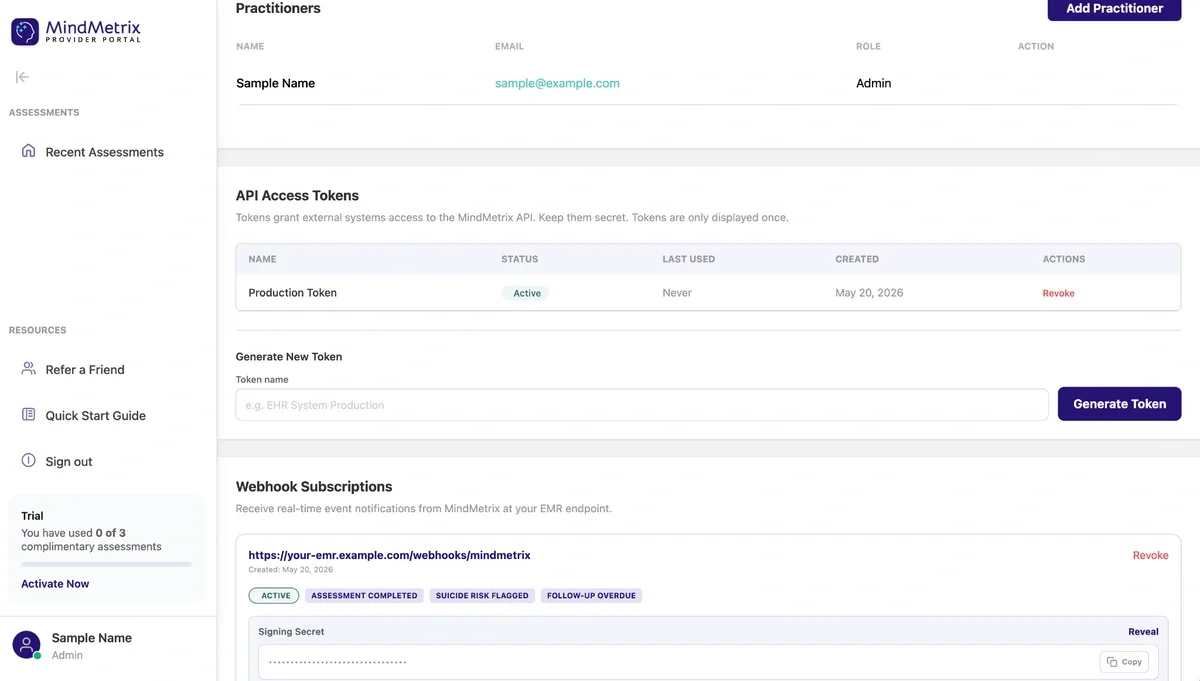
Once the API is enabled, everything you need lives on the Settings Page in your provider portal, organized into two areas: API Access Tokens and Webhook Subscriptions.
API Access Tokens
This is where you create the credential your EMR uses to authenticate. Under Generate New Token, give the token a recognizable name (for example, EHR System Production) and click Generate Token.
Important: tokens are only displayed once. Copy the token the moment it's generated and store it somewhere secure. If it's lost, you'll need to generate a new one.
After generation, each token appears in a table showing its name, status (Active/Revoked), last used date, and created date, with a Revoke action to disable it. To rotate a credential or cut off access if a token is ever compromised, revoke the token, generate a new one, and update your EMR.
Webhook Subscriptions
This section is where you tell MindMetrix to push real-time notifications to your system. Under Add New Webhook, enter your Target URL (HTTPS) — the endpoint on your side that will receive events, e.g. https://your-emr.example.com/webhooks/mindmetrix then check the events you want under Subscribe to Events:
- Assessment Completed
- Suicide Risk Flagged
- Follow-Up Overdue
Click Create Subscription and the webhook goes live. This is exactly where you include or exclude events: subscribe only to what your workflow needs.
Each active subscription then shows its URL, an ACTIVE status, the events it's subscribed to, and a Revoke option. Two features here are especially useful for your developer:
- Signing Secret: a masked secret with Reveal and Copy controls. Your developer uses this to verify the
X-MindMetrix-Signatureon every incoming event (see the webhooks section below), confirming each delivery genuinely came from MindMetrix. - Test Webhook: pick an Event Type, optionally edit the Customize Payload JSON, and click Send Test Event to dispatch a mock payload to your endpoint. This lets your team validate their integration end-to-end before any real patient data flows.
For developers: how it works
The MindMetrix API is a straightforward REST API that returns JSON (and streams binary PDFs for reports). If you've integrated a webhook-and-token API before, this will feel familiar.
Base URL: https://www.mindmetrix.com Version: v2 (all paths are prefixed with /api/v2)
Authentication
Every request carries a bearer token in the Authorization header. An admin practitioner accesses the token from the Settings page of the account (see "How to turn it on" above).
Authorization: Bearer <YOUR_API_TOKEN>
A missing or invalid token returns 401 Unauthorized:
{ "error": "Unauthorized", "message": "Valid Bearer token is required." }
Patient mapping with external_id
You don't have to store MindMetrix's internal IDs. Instead, you tell MindMetrix the identifier your EMR already uses for each patient: the external_id. Once a patient exists, every assessment lookup and follow-up trigger references that same value. The only rule is that it has to be URL-safe (URL-encode it before placing it in a path, or you'll get a 422).
The core workflow
A typical integration follows four steps.
1. Create the patient. This call is idempotent: call it again for an existing patient and you get the current record back (200) instead of an error. New patients must be 13 or older.
POST /api/v2/users
Content-Type: application/json
Authorization: Bearer <YOUR_API_TOKEN>

{
  "external_id": "emr-pat-001",
  "name": "Jane Doe",
  "email": "jane.doe@example.com",
  "date_of_birth": "1990-04-12"
}
Response (201 Created):
{
  "external_id": "emr-pat-001",
  "name": "Jane Doe",
  "email": "jane.doe@example.com",
  "latest_status": null,
  "created_at": "2026-05-06T12:04:00Z",
  "mindmetrix_link": "https://www.mindmetrix.com/providers/1/users/21973",
  "assessments": []
}
2. Check on assessments. Once a patient has assessments, you can list all of them, fetch one by its ID, or jump straight to the most recent one. (A patient with no assessments yet returns 404 on the latest endpoint.)
GET /api/v2/users/{external_id}/assessments
GET /api/v2/users/{external_id}/assessments/latest
GET /api/v2/users/{external_id}/assessments/{id}
An assessment object looks like this:
{
  "id": "2576e7c9",
  "status": "In progress",
  "is_refresher": false,
  "started_at": "2026-05-06T12:05:00Z",
  "completed_at": null,
  "links": {
    "report_pdf": null,
    "quickchart_link": "https://www.mindmetrix.com/providers/1/users/21973"
  }
}
3. Download the report. Once an assessment is complete, retrieve the PDF directly. There's an endpoint for a specific assessment and a shortcut for the latest one.
GET /api/v2/users/{external_id}/assessments/{id}/report.pdf
GET /api/v2/users/{external_id}/assessments/latest/report.pdf
These stream the binary PDF, ready to attach to the chart. If no PDF exists yet, you get a 404.
4. Trigger a follow-up (refresher). When retesting is enabled for your practice, post to the assessments endpoint to start a fresh assessment for an existing patient.
POST /api/v2/users/{external_id}/assessments
You'll get 201 with the new assessment if the patient is eligible, or 422 if retesting isn't enabled for your provider.
Error responses
The API uses conventional status codes. Beyond 401 for auth, expect 404 when a patient or assessment doesn't exist (or belongs to another provider), and 422 when something is unprocessable — for example, an external_id that wasn't URL-encoded:
{
  "error": "Unprocessable Entity",
  "message": "external_id contains characters that require URL encoding. Please URL-encode the value and resend your request."
}
Webhooks: don't poll, get notified
Rather than repeatedly checking for completed assessments, configure your webhooks from the Settings page (target URL, which events to include or exclude, and your signing secret) and let MindMetrix push events to you. Three event types are available:
assessment.completed- a patient finished and the report is generated.assessment.suicide_risk_flagged- findings indicate moderate or high suicide risk. The payload includes arisk_level(e.g.,"HIGH"). This is the one to wire into an alert.assessment.followup_overdue- a patient is now eligible for a follow-up, with the date they became overdue.
Every payload shares a common envelope (event_id, event_type, created_at) plus an event-specific data block. A completed-assessment event looks like:
{
  "event_id": "660c829e-64d1-447e-8c31-7b70213010b9",
  "event_type": "assessment.completed",
  "created_at": "2026-05-06T12:08:04Z",
  "data": {
    "assessment_id": "2576e7c9",
    "external_id": "emr-pat-001"
  }
}
Verify every delivery. Each request includes an X-MindMetrix-Signature header in the form t=<timestamp>,v1=<hash>, where the hash is an HMAC-SHA256 of {timestamp}.{payload_body} computed with your signing secret. Recompute it on your end and compare before trusting the payload. This confirms the request really came from MindMetrix.
Handle retries gracefully. If your endpoint returns anything other than a 2xx, MindMetrix retries delivery up to six times over 48 hours. Make your handler idempotent (the event_id is your dedupe key) so a retried event doesn't double-process.
Getting started
For owners: email support@mindmetrix.com to enable the API, then grab your token from the Settings page and hand it (along with this post) to whoever maintains your EMR integration.
For developers: create a patient, watch for the assessment.completed webhook, and pull the report PDF. Everything else builds on that loop.
The full API documentation lives at mindmetrix.com/api-docs.
Ready to boost your practice?
Try 3 complimentary assessments on us.